
Screenshots

App details
- Updated
- Sep 13, 2005
- Language
- Spanish,English
- Category
- Mobile
SoftPas in:
This product is also available in the following languages:
About Iso Recorder
Download Iso Recorder – Create ISO, Burn ISO, Copy CD, Disk Image, Backup CD
Overview
ISO Recorder is a lightweight utility designed for users seeking a straightforward method to manage disk images and transfer data between CDs. Its primary purpose is to simplify the creation and burning of ISO files, as well as the duplication of data from one CD to another. The app serves as a practical tool for individuals who need to back up software, documents, or other disc-based content without relying on complex software. It is particularly useful for users who work with physical media and require a reliable, no-frills solution for disk image handling.
Target users include home users, small business operators, and IT professionals managing legacy systems or archival data. The app solves common pain points such as the need for quick backup creation and the desire to avoid third-party software with bloated interfaces. By focusing on core functionality—ISO creation, burning, and disk copying—ISO Recorder streamlines these tasks through a minimalistic approach.
Although the developer did not provide additional technical details about the company or background, the app’s long-standing presence in the utility space suggests a niche but functional role in the software ecosystem. Real-world use cases include backing up installation discs, duplicating software media, and preparing bootable CDs. The app’s simplicity and lack of unnecessary features make it a solid choice for users who prioritize efficiency over advanced customization.
Key Features & Functionality
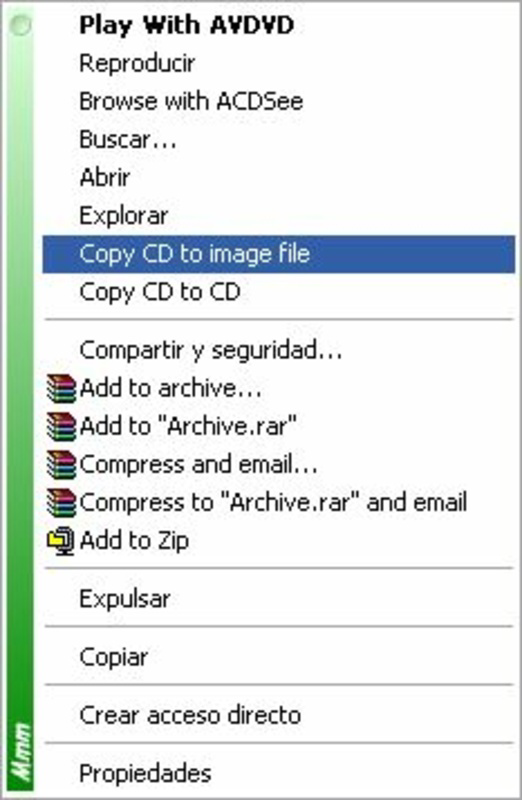
- ISO Creation: Users can create disk images from physical CDs by right-clicking the source disc and selecting “Copy CD to Image File.” This feature enables quick, reliable backups of data and software discs, preserving the original content in a digital format.
- Burning ISO Files: The app allows users to burn ISO images to blank CDs with a simple right-click on the ISO file and choosing “Copy Image to CD.” The process is guided through intuitive context menus, minimizing user error and reducing setup time.
- Disk-to-Disk Copying: With the “Copy Disk to CD” option, users can duplicate data from one CD to another. This functionality supports data sharing and archival, though it is limited to data CDs and does not extend to audio CDs.
- User-Friendly Interface: ISO Recorder operates without a traditional main menu. Instead, all actions are triggered via right-click context menus, making navigation accessible even for users with minimal technical experience.
- Limited Audio CD Support: The app does not support copying audio CDs. Users requiring this functionality should consider alternative tools, as ISO Recorder is designed exclusively for data-based disc content.
For example, a user managing software installation media can create an ISO backup in seconds, store it on a hard drive, and later burn it to a new disc for distribution. Similarly, a technician can duplicate a configuration CD across multiple machines without installing heavy software. The simplicity of the workflow ensures that users can complete tasks efficiently, even with limited experience.
Interface, UX & Performance
ISO Recorder features a minimalistic interface that relies entirely on context menus. There is no main dashboard or navigation panel—users interact directly with the file system through right-click actions. This design reduces visual clutter and focuses attention on the task at hand, aligning with the app’s utility-driven purpose.
The visual style is plain and functional, prioritizing usability over aesthetics. Navigation is consistent: right-click on a CD or ISO file, select the appropriate option, and follow the on-screen prompts. This streamlined flow ensures that users can complete tasks without confusion or unnecessary steps.
Although the developer did not list formal performance metrics, the app’s small file size of 1.3 MB suggests efficient resource usage. It is likely to run smoothly on a wide range of Windows systems, including older hardware. Responsiveness appears to be strong, as the actions are executed directly through the operating system’s shell integration. Stability is expected to be high given the app’s narrow scope and lack of background processes.
Users should expect consistent performance across different device categories, from standard desktops to low-spec machines. The absence of advanced features reduces the likelihood of crashes or errors during basic operations. However, specific performance data or compatibility with newer Windows versions was not disclosed.
Platform Compatibility & Technical Requirements
ISO Recorder is designed for the Windows platform and is compatible with Windows operating systems. The current version is 1.0.0, and the app has a file size of 1.3 MB, making it a lightweight download suitable for systems with limited storage.
Although the developer did not specify minimum OS requirements, the app’s age and small footprint suggest it may run on older Windows versions such as Windows XP, Vista, 7, and 8. However, compatibility with modern Windows 10 or 11 systems is not confirmed. Users should test the app on their system to verify functionality.
Specific requirements such as processor type, RAM, or disk space were not listed. The app does not appear to require additional dependencies, as it integrates directly with Windows shell functions. For users seeking a secure, lightweight tool for ISO management, the app’s minimal footprint is a notable advantage.
Pros and Cons
- Lightweight at only 1.3 MB in size
- Simple right-click interface suitable for beginners
- Efficient ISO creation and burning without extra steps
- Free to download and use
- Minimal system resource usage
- Does not support audio CD copying
- No traditional main menu or dashboard
- Compatibility with newer Windows versions not confirmed
- Limited to Windows platform
- Developer did not provide update history or support details
FAQ
Is ISO Recorder safe to download and install?
Yes, the app is free and does not require installation of additional software. It integrates with Windows shell functions and does not install malware or adware. However, users should always download from trusted sources to ensure security.
Can I use ISO Recorder on Windows 10 or Windows 11?
While the app was released in 2005, its lightweight nature suggests it may run on modern Windows systems. However, official compatibility with Windows 10 or 11 was not confirmed by the developer.
Does ISO Recorder support audio CDs?
No. The app does not support copying audio CDs. It is designed exclusively for data CDs and ISO files. Users needing audio CD duplication should use alternative software.
How do I create an ISO file using ISO Recorder?
Right-click on a physical CD in File Explorer, select “Copy CD to Image File,” and choose a location to save the ISO. The process creates a digital backup of the disc’s contents.
Is ISO Recorder available for Android or iOS?
No. The app is currently only available for Windows. There is no official version for mobile platforms such as Android or iOS.
Final Thoughts
ISO Recorder remains a relevant tool for users who need a no-nonsense solution for creating, burning, and copying ISO files and data CDs. Its minimalist design, right-click functionality, and free access make it ideal for individuals managing software backups, legacy media, or small-scale data duplication. While it lacks support for audio CDs and modern OS compatibility details, its core features are executed with precision.
For users seeking a secure, lightweight utility that avoids unnecessary complexity, ISO Recorder delivers reliable performance. It stands out in the utility category by focusing on essential tasks without bloat. The app is particularly valuable for those who value simplicity and efficiency over advanced features.
Download Iso Recorder now
Guides & Tutorials
How to install Iso Recorder
- Click the Download button above.
- Once redirected, accept the terms and click Install.
- Wait for the Iso Recorder download to finish on your device.
How to use Iso Recorder
This software is primarily used for its core features described above. Open the app after installation to explore its capabilities.
User Reviews
No reviews yet. Be the first to share your experience.
You may also like
more
Que no te pillen¡
About !Que no te pillen¡Reviewed by Jason A. BilbreyShow MoreShow Less

3D Combat Zone
About 3D Combat ZoneOriginally released in 1983, 3D Combat Zone immerses players...

666: El día del portal
About 666: El día del portalOn June 6, 2006, Agent P. Stone uncovers a sinister...

80 in 1 Best Flash games
About 80 in 1 Best Flash games 80 in 1 Best Flash games is a collection of 80 fl...

ABYSS SEEKERーーWhat Do You See Deep in The Abyss
About ABYSS SEEKERーーWhat Do You See Deep in The AbyssIn ABYSS SEEKER, players...

ACA NEOGEO THE KING OF FIGHTERS 2002 for Windows
About ACA NEOGEO THE KING OF FIGHTERS 2002 for WindowsTHE KING OF FIGHTERS 2002,...